Monitoring your balance on your LuLu card frequently will help in keeping track of earnings expenditure, withdrawals, and any remaining funds. No matter if you’re using LuLu Money as a salary card or a Pay My Card, a FAB-linked LuLu salary credit card, or a travel card that is prepaid The process of checking your balance is dependent on the particular card you’re using.
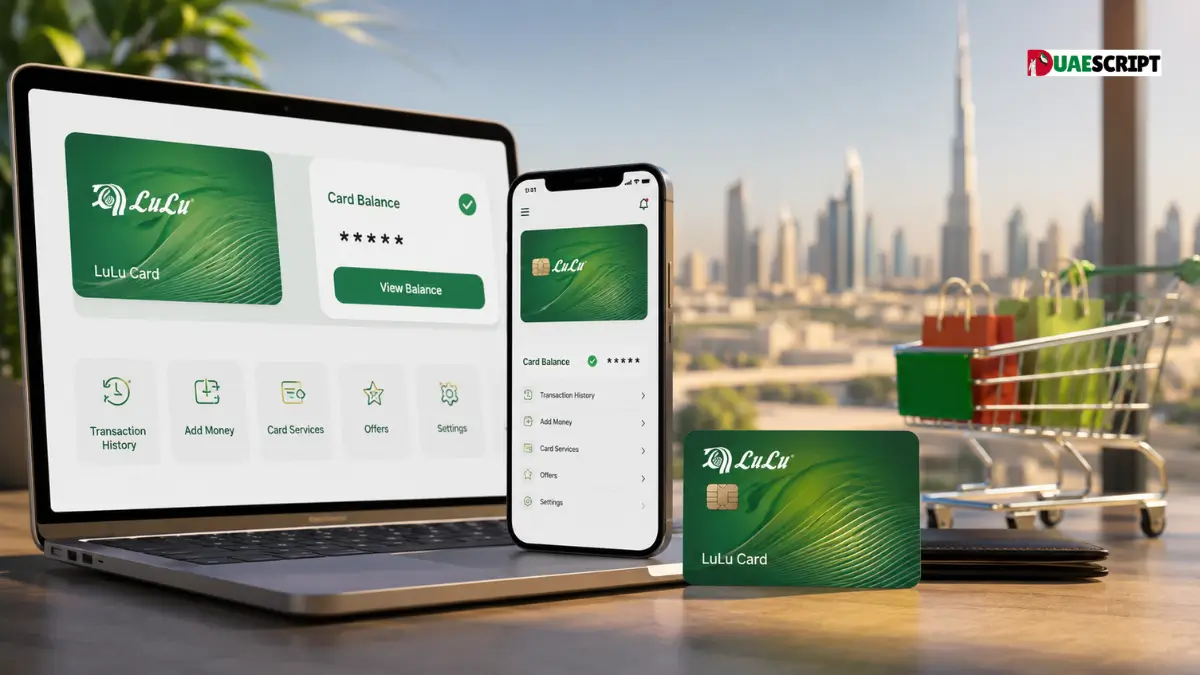
For the majority of LuLu Money salary-card users, the best option is to use to use the LuLu Money app. Official LuLu Money FAQ clarifies that users can access LuLu Money Cards on the home page or from My Cards in the More menu and see the balance that is available on the card’s page.
This guide will explain the most important ways to conduct the LuLu balance check on the internet in UAE and includes ATM options, information about salary cards and balances of prepaid cards Troubleshooting suggestions, as well as commonly asked queries.
What Is a LuLu Card?
A LuLu card may refer to various different products of the LuLu Exchange and LuLu Exchange as well as LuLu Money. These cards are designed to assist employees access and receive their pay via UAE-compliant arrangements.
LuLu Exchange offers its My Pay My Card salary-disbursement option that is compatible to the UAE Wage Protection System (WPS). LuLu also provides an alternative to the LuLu Money Salary Card that integrates together with the LuLu Money app to manage card-related services.
The most current LuLu Exchange WPS Key Facts Statement provides information on different types of salary-cards such as MYPAY: MYCARD FAB (Mastercard), LuLu Money Card Mercury, LuLu Money Card Mercury as well as Huru Card.
Since these cards aren’t necessarily the same, it is essential to determine the specific card before you begin the balance-check process.
How to Check LuLu Card Balance Online in UAE?
If you have an LuLu Money Card, the mobile app is among the most efficient methods of checking your balance.
Check LuLu Card Balance Through the LuLu Money App
Follow these steps in general order:
- Start and open the LuLu Money app on your smartphone.
- Log into your account.
- Choose LuLu Money Cards on the homepage.
- Or, you can choose More, then My Accounts.
- Select the appropriate card.
- Check the available balance on the card’s page.
The official LuLu FAQ confirms the balance that is available for purchase is displayed at the My Card page, including for the virtual card that is displayed at the top of the page.
The app also provides access to other features for managing cards. Based on the app users will be able review the transactions, monitor limits on their cards and reset or change the PIN, as well as secure or manage their account.
Is an Online Balance Check Better Than an ATM?
If you have an app-supported card Online banking is typically more convenient since you can view your balance online without going to an ATM. It makes it easier to track accounts and transaction activity during the course of your day.
However, the specific options you have are contingent on the type of card you have and the account set-up.
LuLu Salary Card Balance Check Online
An LuLu Payroll card typically employed to pay salary via LuLu Exchange’s payroll services, WPS. Its My Pay My Card solution is created to give employees access to their salary and other card services.
If you’re a owner of an LuLu Money Salary Card you can access the LuLu Money application to gain access to the card and see the balance available. Based on LuLu Money, the salary card is linked to the MyPay program, and can be operated using the application.
If you are checking the balance of your credit card be aware that your current balance may not match the amount you anticipate from your current pay. Recent withdrawals, purchases, fees, pending transactions or any other activity on your account can impact the available funds to spend.
If your salary has just been approved however the balance hasn’t changed, look up the history of your transactions and confirm the credit with your employer.
LuLu FAB Salary Card Balance Check Online
The term LuLu FAB salary card could cause confusion as LuLu Exchange’s WPS documentation mentions MYPAY: MyCARD FAB (Mastercard) in the form of a separate product for a salary card.
In the event that your credit card FAB-linked My Pay My Card, you must follow the guidelines on the card, not assuming that it has the same procedure for checking balances as the LuLu Money Card.
The most current LuLu Exchange WPS Key Facts Statement also lists the various charges associated with its salary-card products. For instance, it lists an ATM charge for balance inquiries on FAB My Pay My Card. The initial two balance inquiries each monthly at FAB ATMs not subject to that cost.
So, if you’re looking for LuLu FAB card balance check, examine the card and find the issuer’s and the product’s name. This will help you avoid following the instructions that are specifically for another LuLu card.
LuLu ATM Card Balance Check
A bank ATM is an alternative option in case you are unable to access your balance on the application.
The standard procedure is:
- Visit a compatible ATM.
- Insert your LuLu pay card.
- Enter the card’s PIN.
- Select the balance inquiry option.
- Examine the balance that is displayed in the display.
- Get a receipt in case you require a physical record.
ATM balance inquiries can result in costs based on your particular account and ATM. The most current LuLu Exchange WPS Key Facts Statement details the fees associated with balance inquiries for its products with salary and customers should verify the most current fee schedule rather than thinking that each ATM request is free.
If you own a FAB-linked my Pay My Card, the current fee document contains specific information regarding balance inquiries on FAB ATMs.
LuLu Exchange Card Balance Check
“LuLu” or LuLu Exchange card can describe various products, therefore the best balance-check method is dependent on the specific card.
For those who use salary cards, LuLu Exchange provides WPS-related card products, such as My Pay My Card as well as LuLu Money Card.
If you have LuLu Money Travel Card, the balance is handled differently since it’s a prepaid multi-currency card. Official Travel Card FAQ says customers are able to view their wallet balances as well as transactions history, as well as card transactions via the LuLu Money application.
That means just looking for an unrelated “LuLu Exchange card balance check” might not provide the correct information. Make sure you know the type of card first.
LuLu Balance Check for a Prepaid Card
The LuLu Money Multicurrency Travel Card is the Prepaid Visa card that permits users to hold, load and use different currencies. It comes with an AED wallet that can be used with additional foreign currency wallets.
Since it’s a prepaid card and not a credit card, you are able to use the card to withdraw or spend only money loaded on the card. It is stated in the LuLu Money Travel Card Answers to FAQ states wallet balances as well as transactions can be reviewed via the LuLu Money application.
When you check a travel card with a pre-paid balance, make sure to check the particular currency wallet. For instance your AED balance and foreign currency wallet might have different amounts.
The app is also able to help users keep track of their card usage and also manage funds between wallets.
How to Check Your LuLu Card Transaction History?
The ability to check your transaction history can be beneficial when the balance appears to be lower or more than you expected.
In the case of LuLu Money Cards, the application provides transaction management and card-related features. LuLu declares that its salary-card service allows users to review the history of their transactions as well as set usage limits. Customers can also reset their PINs, and manage their card using its LuLu Money app.
Take a look at your most recent:
- Salary credit
- ATM withdrawals
- Retail purchases
- Online payment
- Transfers
- Charges, fees or charges
- In the midst of transactions
If you discover an unidentified transaction, recognize, you should contact LuLu support via an official channel. Do not share the PIN and OTP to anyone.
What You Need for a LuLu Card Balance Check?
| Requirement | Purpose |
| LuLu card | Identifies your card |
| Registered mobile number | Verification of your account |
| LuLu Money app | Online card management |
| Internet connection | App access |
| OTP | Security verification is necessary when needed. |
| Card PIN | ATM transactions and queries |
The requirements you need to meet can differ dependent on the type of card you are using and the service you make use of.
Why Is My LuLu Card Balance Not Showing?
Sometimes, your balance might not be as apparent. The most common causes are a delay in the salary credit or transactions that are pending as well as app issues card limitations, inaccurate account details.
Try these troubleshooting tips:
- Close and then reopen your LuLu Money app.
- Check to ensure that you’re using the correct account.
- Verify the recent transactions history.
- Check if your paycheck was paid.
- Make sure your credit card is locked or active.
- Check that the app is up-to-date.
- Contact the LuLu customer service department If the issue persists.
LuLu’s app can also provide card control functions, such as unlocking and locking cards, and activation of card and other operations for managing cards can be accomplished using the app’s processes available.
LuLu Card Balance Check: Online vs ATM
| Method | Convenience | Best For |
| LuLu Money App | Very high | Quick online checks |
| ATM | High | Users who prefer terminals that are physical |
| Transaction history | High | Monitoring recent activity |
| LuLu’s support | Moderate | Card or balance problems |
| LuLu Exchange branch | Moderate | Assistance in person |
The app is often the most practical choice for LuLu Money Card because it allows users to view their balance as well as manage other functions of their card on their phones.
Tips to Keep Your LuLu Card Secure
When doing a LuLu credit balance check online, security should be the top prioritization.
Never share your card’s PIN OTP password or any other security details with anyone else. Do not enter your card information when you visit websites that say they offer instant balance checks, unless they are legitimate LuLu channels.
It is also recommended to regularly check your transactions history. If you spot an unidentified payment or withdrawal, please report it to the appropriate support channel.
For Travel Card users, LuLu suggests that you use the mobile app in order to secure the card in case it gets stolen or lost, and then contacting customer support for help.
Conclusion
A LuLu balance check on your card online in the UAE is usually done easily through the LuLu Money application if you have a LuLu Money Card. With the app, customers can log into LuLu Money Cards or My Cards and see the available balance.
In reality, LuLu offers multiple card products that include LuLu Cash salary credit cards as well as My Pay My Card products linked to FAB, as well as travel cards that can be prepaid and multi-currency.
If the online service is not available In the event that it isn’t available, an ATM or the official customer-support channel could be a viable alternative. Be sure to identify your specific card’s type prior to performing balance check instructions. Always make use of the official LuLu channels to access financial information.
Frequently Asked Questions
1. What can I do to verify my LuLu balance online?
Launch the LuLu Money app, open LuLu Money Cards as well as My Cards choose your card, then check the balance available.
2. What can I do to verify my LuLu card’s salary balance?
For compatible LuLu Money Salary Cards, make use of LuLu Money. Download the LuLu Money app and open the appropriate card to check its balance.
3. Do I have the ability to verify the balance of my LuLu card in an ATM?
Yes. ATMs that are compatible can offer information about your balance, however the applicable charges are based on the ATM and card.
4. What can I do to determine your LuLu FAB card balance?
Find your FAB-linked Pay My Card and use the balance-checking method that was designed for the card. The product is listed in the LuLu Exchange’s WPS documentation.
5. Do I have the ability to see my LuLu prepaid card balance on the internet?
Yes. LuLu Money Travel Card users are able to view their wallet balances via LuLu Money. LuLu Money app.
6. What’s wrong with my salary at LuLu not changed?
The pay check may be in processing an underlying transaction, or a technical issue might cause a change in the displayed balance.
7. Do I have access to my LuLu transactions online?
The supported LuLu Money cards provide transaction-history and card management features via the application.
8. Are LuLu salary card identical to an prepaid card?
No. LuLu has a range of credit card options with different features, and the balance-checking methods may differ.
9. What can I do should I do if I find that my LuLu card’s balance isn’t correct?
Review your transaction history first, and then make contact with the official LuLu support in the event that the issue persists.
10. Does this the LuLu Money Travel Card prepaid?
Yes. It’s a pre-paid card that is multicurrency Visa Travel Card that can be loaded with cash to spend and withdraw.
Recommended:
How to Check Balance in NBAD Card? | Complete Guide for FAB/NBAD Card Users
Quick & Simple Guide to PPC NBAD Balance Check in UAE
Quick Guide to Al Jafiliya Immigration Office Dubai
How to Use Etisalat Quick Pay? | A Step-by-Step Guide for Recharge and Payments
Share this article

Written by : Barika Awad
Barika Awad is a writer at UAE Script, sharing insightful content on fashion, lifestyle, and personal style with a focus on practical, elegant ideas.
Follow us
A quick overview of the topics covered in this article.